Technology 
Bits and bobs I've learnt along the way:
When reaching a Web service from a remote machine through the browser you get the message "The test form is only available for requests from the local machine."
Simply enter the following into the Web.config file in the <system.web> section:
<webServices>
  <protocols>
	<add name="HttpPost"/>
	<add name="HttpGet"/>
  </protocols>
</webServices>
When Internet Explorer 6 comes across a Web page which has a .png file in it that has a transparent background it will look bluey grey rather than transparent! IE7 has fixed the problem but in the mean time why not make them .gifs instead or use the AlphaImageLoader filter as suggested by Microsoft
http://support.microsoft.com/kb/294714
I recently received a call asking for help with installing a Web site in IIS. The client had Windows Server 2003 and IIS 6.0. They had installed a Web site developed in .NET 2.0 using a provided .msi file. When they went to the first .aspx page they got a Page Not Found 404 error. I checked the file name, security in IIS, file permissions on the virtual directory, all seemed fine. So, I checked the IIS error logs - no more clues in there.
After some searching I found the solution - they needed to go to IIS, Web Extensions directory and allow ASP.NET. By default, it is disabled in Windows 2003 in order to preserve security. Note: Web Extensions are new to IIS 6 so other versions, for example, IIS 5.1 won't have it.
If when trying to view your .aspx pages that are running on an IIS server, you get the message "Server Application Unavailable. The web application you are attempting to access on this web server is currently unavailable. Please hit the "Refresh" button in your web browser to retry your request." examine the security on your sites folder. Navigate to the folder which houses your files. Right click. Choose Properties and Security. Make sure the appropriate accounts have read access.
If that does not work, make sure that your ASPNET account is not locked out or disabled. Go to:
- My computer
- Properties
- Manage
- System Tools node
- Local Users and Groups node
- Users folder
- ASPNET account
- Properties
- Uncheck 'Account is disabled' and 'Account is locked out'
A customer recently installed an ASP.NET Web Service which I had developed and asked me why they were receiving this error when all the files were in place as expected. They were using IIS 6. To solve this is simple - make sure that under Web Service Extensions is "Enabled", not "Prohibited"
Having obtained a WSDL file from a customer I figured we could create a virtual directory in IIS containing this file. Then I thought we could create a new Web Site in Visual Studio and 'Add Web Reference', click Web Services on the Local Machine and voila program against it. Nothing is ever that easy!!
Having gone to Add Web Reference and pointed to the WSDL file, I was presented with a message box asking for a Username, Password and Domain. So I tried to access the WSDL file through IE and got an authentication error. A ha - to fix this I had to go to the folder containing the WSDL file, right click, Security tab and give users the appropriate access.
Once I had done this I could see the WSDL using IE. So back to Visual Studio, Add Web Reference. This time I got a message of "The proxy settings on this computer are not configured correctly for Web discovery." and the Add Reference button was greyed out. I read lots of sites on the Web relating to LAN Settings in Connections tab in IE and the proxy server. Following these sites made no difference!
Right I thought, I'll create the proxy classes myself using WSDL.exe. So, I went to Start, All Programs, Microsoft Visual Studio 2005, Visual Studio Tools, Visual Studio 2005 Command Prompt. In the command prompt I entered "wsdl path to WSDL - load in browser and copy and paste! /l:vb". /l means language - in this case VB. But this revealed some errors in the WSDL:
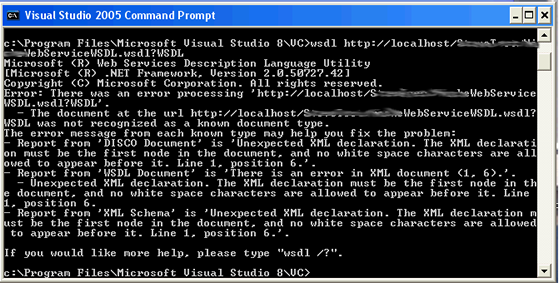
A ha! There was a problem - there was stray white space before the <?xml version="1.0" encoding="utf-8" ?> declaration in the WSDL file. I deleted this and ran the WSDL command again. This time it worked and produced the .vb file placing it in C:\Program Files\Microsoft Visual Studio 8\VC\ folder. So, I grabbed that file, went to Visual Studio, 'Add','Existing Item...', and pointed to that vb file. Success!! I could then program against it. I then tried the 'Add Web Reference' option against the WSDL file with the deleted white space and it worked!!! Arh well, you live and learn!! Damn white space!
If you use .Focus in ASP.NET in page load it works fine . . . . first time! If you have content in update panels and perform a .update on one of these panels .Focus appears to do nadda! Try using ScriptManager.GetCurrent(this).SetFocus(Me.controlName.ClientID) instead. .ClientID is useful if you have master pages as you don't have to hard code the ctl00_ContentPlaceHolder part.
Lately I've (unfortunately!) found the need to write JavaScript to control the scrolling of a div that housed my GridView. I found this useful post regarding scrolling to the bottom of the div:
JavaScript: Scroll to Bottom of a Div
Sys.WebForms.PageRequestManager. getInstance().add_endRequest(EndRequestHandler);
function EndRequestHandler(sender, args)
{
window.scrollTo(0, 0);
}
http://rolf-cerff.de/blogs/dotnet/archive/2007/07/20/scroll-to-the-top-of-a-web-page-after-partial-page-update-updatepanel.aspx
- You can still click on items in the page behind the popup unless you put BackgroundCssClass=something
- Modal popup won't go away once you've clicked it unless TargetControlID= a button
- OkControlID can cause problems - http://forums.asp.net/p/1153225/1886581.aspx, http://forums.asp.net/p/1239911/2262826.aspx
- Useful links for doing it with Gridviews - http://forums.asp.net/p/1057343/1508157.aspx, http://mattberseth.com/blog/2007/07/confirm_gridview_deletes_with.html, http://episteme.arstechnica.com/eve/forums/a/tpc/f/6330927813/m/942007322931
	protected void Page_PreInit(object sender, EventArgs e)
	{
		if  (Request.Browser.Type == "IE6")
		{
			Page.Theme = "Standard-ie6";
		}
	}
http://forums.asp.net/p/1204670/2105729.aspx
You can use response.write, e.g. to force a refresh once a window closes you can do:
Response.Write("<script language='javascript'> { self.close(); window.opener.location.reload(true); }</script>");
When you try to open .doc, .xls etc from an SSL web site you get the message:
Internet Explorer cannot download JobDetails.aspx from url. Internet Explorer was not able to open this Internet site. The requested site is either unavailble or cannot be found. Please try again later.
This was caused by the fact that the page was set to 'no cache'.
When the page loaded it added:
Response.Cache.SetNoStore();
Response.AppendHeader("Pragma", "no-cache");
So I set Response.ClearHeaders() when the user clicked the link to download the .doc http://support.microsoft.com/kb/316431/
Recently I received this error message:
Invalid postback or callback argument. Event validation is enabled using <pages enableeventvalidation="true" /> in configuration or <%@ page enableeventvalidation="true" %> in a page. For security purposes, this feature verifies that arguments to postback or callback events originate from the server control that originally rendered them. If the data is valid and expected, use the ClientScriptManager.RegisterForEventValidation method in order to register the postback or callback data for validation.
It occured because the grid binding occurs everytime not just on !IsPostBack. This was necessary to allow another control to work so the following was used to detect what control had caused the postback:
Control c = GetPostBackControl(Page);
        if (c != null)
        {
            if (c.ID != "imgbtnDownloadDoc")
            {
                BindGrid();
            }
        }

public static Control GetPostBackControl(Page page)
{
    Control control = null;

    string ctrlname = page.Request.Params.Get("__EVENTTARGET");
    if (ctrlname != null && ctrlname != string.Empty)
    {
        control = page.FindControl(ctrlname);
    }
    else
    {
        foreach (string ctl in page.Request.Form)
        {
            Control c = page.FindControl(ctl);
            if (c is System.Web.UI.WebControls.Button)
            {
                control = c;
                break;
            }
        }
    }
    return control;
}
http://ryanfarley.com/blog/archive/2005/03/11/1886.aspx
http://odetocode.com/Blogs/scott/archive/2006/03/20/3145.aspx
Recently I encountered a problem where the .SelectedValue of my radio button list wasn't coming through - it always thought the selected one was the first even though it clearly wasn't! After some investigation I realised that two items in the list had the same value and that's why it was always coming through as the first one!
Format string in an ASP.NET DataGrid BoundColumn to currency with no decimal places e.g. £25,000 = DataFormatString="{0:c0}".
DataView v = dt.DefaultView;
v.Sort = "level ASC";
dt = v.ToTable();
Recently, I had a Web form with username and password fields, and a linkbutton to login. The following JavaScript was used so that when the user pressed the 'Enter' key on the keyboard whilst they were in the password field, it would effectively complete the click action of the login button and log the user in.
<script language="javascript" type="text/javascript">
    function UsernameKeyDown(e) {
        var eventObject = window.event ? event : e;

        if (eventObject.keyCode == 13)
          document.getElementById("<%= txtPassword.ClientID %>").focus();
    }

    function PasswordKeyDown(e) {
        var eventObject = window.event ? event : e;

        if (eventObject.keyCode == 13)
          document.getElementById("<%= lnkLogin.ClientID %>").click();
    }

</script>

<asp:TextBox ID="txtUsername" runat="server"
onkeydown="UsernameKeyDown(event);" />
<asp:TextBox ID="txtPassword" runat="server"
TextMode="Password" onkeydown="PasswordKeyDown(event);" />
<asp:LinkButton ID="lnkLogin" runat="server"
OnClick="lnkLogin_Click" />
This worked fine in IE but not Firefox, Safari or Chrome! Turns out that Firefox doesn't process this JavaScript execution of the click event for hyperlinks (i.e. what an ASP link button is rendered as) but it will for ASP Buttons. So, I thought I would put a button on the form that wasn't visible and fire that if the browser was something other than IE. Using Visible=false does not work either as it doesn't render the control. But using style="display:none;" gets the best of both worlds!
<script language="javascript" type="text/javascript">
    function UsernameKeyDown(e) {
        var eventObject = window.event ? event : e;

        if (eventObject.keyCode == 13) {
          document.getElementById("<%= txtPassword.ClientID %>").focus();
          return false;
        }
    }

    function PasswordKeyDown(e) {
        var eventObject = window.event ? event : e;

        if (eventObject.keyCode == 13) {
          var browser = navigator.appName;

          if (browser == "Microsoft Internet Explorer") {
            document.getElementById("<%= lnkLogin.ClientID %>").click();
          } else {
		  document.getElementById
		  ("<%= lnkLoginFF.ClientID %>").click();
          }
       }
    }

</script>
<asp:LinkButton ID="lnkLogin" runat="server"
OnClick="lnkLogin_Click" />
<asp:Button ID="lnkLoginFF" runat="server"
style="display:none;" OnClick="lnkLogin_Click" />
<script type="text/javascript" language="javascript">
Sys.WebForms.PageRequestManager.getInstance().add_endRequest
(EndRequestHandler);
	function EndRequestHandler(sender, args){
	//do stuff
}
</script>


OR

function pageLoad(sender, args) {
	if (args.get_isPartialLoad()) {
	SetLoadingPanelVisibility(false);
	}
}
Specify just like you would any other column you want returned in your query results:
ROW_NUMBER() OVER({3} /*DYNAMIC ORDER GOES HERE*/) AS rownum,
Count(*) OVER() as totalnum